How-to: Use your shiny new Treo 700p as a USB Modem for your laptop and get super-fast Sprint EVDO speeds

If, like me, you found your new Treo 700p to be AWESOME, except for the $39.99 or $49.99 ADDITIONAL monthly charge to actually USE the Bluetooth DUN feature (that wasn’t mentioned ANYWHERE in the marketing that I saw) so that you can hook up your laptop to it and surf the internet using your phone as a connection, (which I only found out about by calling support and asking why using DUN wasn’t working) then you will probably be VERY interested in this handy $24.95 application from Mobile Stream:


Treo USB Modem software screenshot

USB Modem allows you to use Treo 600, Treo 650 and Treo 700p smartphones as a USB modem for connecting a desktop or notebook computer to Internet. To surf the Internet from your PC you will need only a USB cable and a Treo with GPRS/EDGE service or CDMA 1x/EvDO data plan.

Features

* Support for Treo 600, Treo 650 and Treo 700p smartphones
* Support for Windows XP, Windows 2000, Mac OS X and Linux operating systems
* Support for USB and Bluetooth connectivity
* Support for background mode so it is possible to make outgoing voice calls or perform other activity on the Treo without disabling the modem mode
* Support for Fax modem operation
* Small memory footprint (30 KB)

I couldn’t get the Bluetooth connectivity option to work. The USB connection option seems to do the trick however. I’m now able to use my phone now exactly as I wanted to without paying the extra EVDO connection fees (hopefully).

Also, I found a bug where if you have Menu Meters installed and the Bluetooth indicator in the menubar as well Menu Meters keeps on restarting while you are connected. If you turn off display of the Bluetooth icon then everything is fine.

Hopefully this won’t get shut down, since it basically enables exactly what you want — internet access on your laptop (in my case a Mac OS X G4 Powerbook) using EVDO speeds.
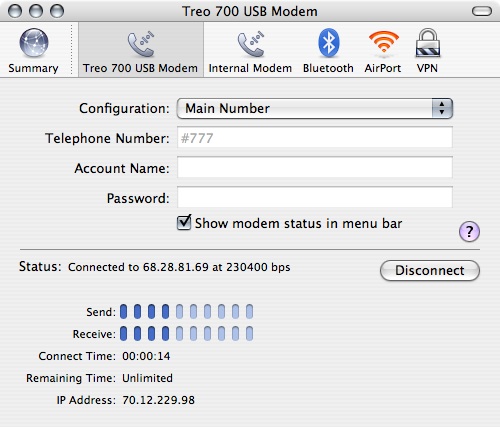
Internet Connection panel showing Treo 700p USB Modem setting

Directions:

  1. First, download the trial of the USB Modem software to make sure this will all work for you.
  2. Follow the User Guide instructions to configure your laptop, and install the USB Modem .prc onto your Treo 700p.
  3. Go to Prefs, click on Networking. Make sure that you are currently disconnected. Otherwise the USB modem won’t work.
  4. Click on the USB Modem application
  5. Click the Enable Modem Mode button. Leave the Connectivity method set to USB, and the Background mode set to checked.
  6. Under OS X, open Internet Connect application, and select the Treo 700 USB Modem option. You should see #777 in the Telphone Number, leave everything else blank.
  7. Click Connect.
  8. You should see it saying Contacting PPP Server… then Authenticating, then Connected.
  9. Use the internet on your laptop to check your email, ssh, surf the web, instant messenger, whatever
  10. When you’re done using the internet, click Disconnect in Internet Connect, then click the Disable Modem Mode in USB Modem. If you don’t do this, the next time you try to sync using the USB cable you will get an error message stating that the connection is already in use.
  11. Enjoy super-fast EVDO speeds on your laptop wherever you go…!!!

I did find that occasionally you will need to turn the phone off and then back on again to reset the internal networking features after you’ve used it as a modem.

I purchased the software since it seems like exactly what I need, and I’d encourage you to do the same. Also, I haven’t gotten my first bill with the new phone yet, so I’m not 100% certain that there won’t still be a charge for using the phone as a modem. But you may as well give it a shot.

I’ll update this post if I see anything on my next bill — I don’t expect to be using the phone as a modem all the time since I’m usually in the vicinity of a WiFi connection.

Update 1: I haven’t seen any additional charges on my bill, so this looks like a pretty great solution.

Update 2: Warning: please see comment #23 below for a problem that David had with this where it “fried” his hard drive. I’m not sure exactly what happened, but please use caution when following these instructions. I haven’t had any problems with it at all, but you may want to backup your hard drive before you proceed.

Update 3: – Jan 28, 2008 – Note: it appears that Sprint / Nextel has changed their terms and conditions to specifically exclude using workarounds like this. Here is the exact text of their current T&C as it applies (emphasis added):

Vision/Power Vision: Services are not available with all Sprint phones. Usage is calculated on a per kilobyte basis and is rounded up to the next whole kilobyte. Rounding occurs at the end of each session or each clock hour and, at which time we deduct accumulated usage from your plan, or assess overage or casual usage charges. You are responsible for all data activity from and to your phone, regardless of who initiates the activity. Estimates of data usage will vary from actual use. Your invoice will not separately identify the number of kilobytes attributable to your use of specific sites, sessions or services used. Premium content (games, ringers, etc.) priced separately. Services are not available for use in connection with server devices or host computer applications, other systems that drive continuous heavy traffic or data sessions, or as substitutes for private lines or frame relay connections. Except with phone-as-modem plans, you may not use a phone (including a Bluetooth phone) on a plan with unlimited Vision/Power Vision as a modem in connection with a computer, PDA, or similar device. We reserve the right to deny or terminate service without notice for any misuse. Availability of downloadable or streaming content is subject to change.


You can read my response below, but basically I think they’re shooting themselves in the foot here. I haven’t heard anything from them about this, and probably they’ll only use that T&C to address specific problem usage (for them) where they have a customer using too much of their “unlimited” data plan. I don’t think it’s a real great strategy to tell some of your most fanatical customers and fans that they are basically screwed. Because heres the thing: we have options, some great ones. It’s probably time to look at shopping for a different carrier if you care about regular computer usage without having to pay their extortionate fees for using your computer with this phone as a modem.

Popularity: 3% [?]

This website uses IntenseDebate comments, but they are not currently loaded because either your browser doesn't support JavaScript, or they didn't load fast enough.

206 Responses to “How-to: Use your shiny new Treo 700p as a USB Modem for your laptop and get super-fast Sprint EVDO speeds”

  1. Allen Kelman Says:

    I followed these instructions, but the Treo 700 USB setting never came up in network settings as shown above. Any suggestions? I’m on Sprint.

  2. Gabriel Says:

    I think it showed up for me after I turned on the USB Modem software on the phone, then plugged it in via USB. If you open up your Console, you should see it say something like, found USB Treo Modem or something like that. Then it should show up as an additional connection option in Internet Connect.

  3. Leo O'Donnell Says:

    Is it necessary to contact Sprint to get this to work? I’ve installed everything, but the ppp connection always fails (yes, I’ve disconnected from the network first).

    Thanks for the post. I’d appreciate any help.

  4. Gabriel Says:

    Leo,

    I don’t think you should have to contact Sprint to get this to work. Are you getting the EVDO speeds with the Blazer browser?

  5. Tony Says:

    No need to contact anyone. Just install it, hook the Treo to the computer, launch the software, enable the modem and the thing appears only then on either the Mac OS X networkng list or “pops” Windows XP and installs as a USB Modem. Oh, put the computer driver in it’s required location first.

    Watched a 100K feed in a medium to poor coverage area for nearly 2 hours w/o any problem at all. Darn near like being at home.

    Kicks butt!

  6. Gabriel Says:

    After I upgraded to the latest version of the USB Modem software, the stability problems that I was seeing have totally gone. It works like a champ now. It is so sweet having reasonably high-speed internet wherever you can get a cell signal.

  7. Mark Marshall Says:

    I just want to make sure – this will work with a Treo 650, and it works with a standard “Sync” cable?

  8. Gabriel Says:

    Mark, I don’t know if this will work at all with a Treo 650. You should try the free trial version of the software to see.

  9. Nand Nayar Says:

    I am thinking of getting the 700p and sprint service. On doing a search on google, I came across your blog. I have a few questions…

    Have you gotten your sprint pcs bill? Have they charged you anything extra for this use of the USB connection? What type of service plan do you have for the EVDO?

    Thanks in advance for your response.

  10. Gabriel Says:

    Nand,

    When you buy the Treo 700p, there is a minimum level of service to support the EVDO features / data on the phone.

    I haven’t seen any additional charges (as there hopefully shouldn’t be, since the plan allows for unlimited data use for on-phone applications, and the USB Modem software is an on-phone application).

    I recommend the setup, since it is extremely handy having relatively high-speed internet wherever you are. Sometimes it’s only just a little bit faster than dial-up, sometimes a lot faster. I think it may depend in part on the number of people using the EVDO network locally.

  11. Nand Nayar Says:

    Gabe,
    Thanks for the reply. I looked into the plans that Sprint is offering for EVDO, and there is an unlimited data plan called power vision and with the pics and video package, it is an additional $20 for the primary line. This is what I am planning on getting. Their data plan using the modem costs $39.99 or an extra $20 more a month!
    So, the USBModem package is a slam dunk as far as I go.

  12. Gabriel Says:

    Yeah, that’s what I thought as well… :)

  13. Pat68 Says:

    whow, works like a charm, thank you so much, I stumbled by this webiste by chance. Can I now downgrade my 39$ unlimited package to the 15$ basic unlimited package? I dont care about Picture mail, I can send them by regular email which works great on the new Treo700p. I’m impressed.

  14. Gabriel Says:

    Pat,

    I would think you can probably change your account level by signing in to the online account area and clicking the change account link… or just call up Sprint customer service and tell them you want to take off the extra package.

  15. scott Says:

    fyi. i got this to work on my macbook pro no problem. i’m using sprint

    thanks man, your instructions made it dirt simple.

  16. Ken O Says:

    I’m unable to get my Sprint Treo 700P working with my Windows XP laptop using bluetooth. I have the powervision/$20 month unlimited package.

    The laptap and the cell phone are paired and I can tell they see each other. I just can’t get the dial up to connect… it just hangs on the dialing and nothing seems to be happening on the cell phone.

    Can you help or direct me to resouce? Thanks!

  17. Scott Says:

    Came across your site and downloaded the software from mobile stream. I printed the user guide first. It was pretty much a smooth install. I simply followed the directions in the manual.

  18. Gabriel Says:

    Ken,

    Have you tried using the USB cable instead of Bluetooth? It seems to work a lot better, and is also faster speed than Bluetooth.

  19. Scott Says:

    I never used the Bluetooth at all. Just the cable.

  20. james Says:

    I got connected with no problem and this is what I was looking for but after a two min. I get inernet connection was terminated because the other sideis n ot responding. Please try again. I followed exact instruction. I have spirint with treo700p send ppp packet is enable. Can anyone help? I would love to buy this but i need it to work.

    thanks

    james

  21. hometech99 Says:

    $39.99 or $49.99 ADDITIONAL charge- well, thats for the data plan itself- thats not the “additional” part of using the palm with a laptop, which is $10-15 or something. did you expect to use the EVDO data network for free as part of a voice plan?? btw, i am not working in the wireless industry at all.

    i wrote this else where, but it comes down to this:

    here’s what i figure- its not so much extra for the “feature” of tethering itself. they fixed that $49 price thinking how many kb you would actually receive to a Palm device. so, its “unlimited Palm usage” in a way. Laptops receive much more kb of data doing their browsing with IE, Mozilla, etc. also, all those background programs we have on laptops like antivirus, commercial software that autochecks for updates, windows update, etc- you get the picture- all of that is much more volume of data transfer in.

    notice the VZW data plan for a laptop card is $59 for vzw customers and $79 if not. so, they figure if the palm is hooked to a laptop, you will be receiving (via file, browsing, etc) much more kb of data, hence the bump-up in price.

    so as the plan sits at $49, they are basically discounting you (Sprint even more- almost half VZW $49 price for handheld unlimited data plan) for being on a device that typically uses much less kb transfer than a laptop. they could just charge all of us vzw customers $59 right at the bat.

    do i agree, no. but its their plan and we signed up for it. its all about data transfer metering and typical usage even if heavy, but on a handheld device. dont know if the fine print states anywhere that the surcharge is for the “feature” of tethering, but i bet it has somewhere about what device the $49 is “unlimited” for. meaning- if they see your usage in the average of what connection cards are using and well above the average of what handheld unlimited users are doing, you could get nailed.

    i for one want the thether feature just for the feature- i wont be on it 8 hours a day doing all my work, so the USB Modem program is a little fix for me- i wont be receiving the kind of data a road warrior is using.

  22. ken Says:

    got bluetooth to work for laptop.

    have xp laptop with treo 700p bluetooth DUNS.

    1) dropped the $20 month for vision and traded in for $39 EVDO phone as modem. both phone and laptop work fine.

    2) downloaded palm desktop 4.1.4 version that comes with treo 700p. didn’t have it loaded on laptop before.

    3) downloaded sprint connection manager. and installed after palm desktop install.

    4) set up DUNS with no username or password. just dialing #777 over bluetooth.

    Worked great!!!!!

  23. David Says:

    The software fried my 2 month old Macbook!!! Had to get it repaired and lost everything on my HD.

  24. Gabriel Says:

    David,

    That seriously sucks!

    Did you figure out how the software did that?

    As far as I know, the USB Modem software only runs on the Treo, with a modem driver on the Macbook, and then it operates exactly as if you had hooked up a regular USB modem and were doing dialup.

    Did the problem happen during installation? What were the conditions that surrounded frying your Macbook?

    I have continued to only have good experiences with my Treo 700p + G4 Powerbook combination (actually using it right now to post this…)

    If you can share the circumstances surrounding your problem maybe other people can avoid the same thing happening.

  25. theoldmoose Says:

    Works like a charm for me on 700p, running Windows XP on the laptop. Bonus is that the 700p also charges via the USB cable, so I don’t have to cart around a triple-cube tap extension cord and supply for my phone/laptop combination, like I needed to with my i500. The EVDO speed is impressive, especially when accessing the Sprint site (of course).

    Interface is more clunky than the way it would work if the dialup configuration was enabled by Sprint, like it should be. It’s annoying to have to pay extra for the ‘Power’ service, but then charging on top of that for dialup was more than I could stomach. We have three phones on this plan, sharing 2000 minutes, with one ‘Power’ phone and two vision phones, so I figure I’ve paid enough in monthly fees, thank you very much.

    Thanks for pointing out the mobile-stream software. For whatever reason, it doesn’t show up in Google searches. Instead, your instructive posting was tops in the relevance rankings.

  26. Mark Says:

    Hi Gabriel,

    Just came across your article on how to use Mobile Stream and am interested in trying it. However, the two pictures do not show up in my browser. They may not be totally necessary and I will try to get things working, but thought you’d like to know.

    Here is the link to your article that I used:

    http://www.gabrielserafini.com/archives/2006/06/02/how-to-use-your-shiny-new-treo-700p-as-a-usb-modem-for-your-laptop-and-get-super-fast-sprint-evdo-speeds

  27. Gabriel Says:

    Mark,

    Thanks for the note. I’ve fixed the image links.

  28. Gabriel Says:

    They just released version 1.5 of their software, and it adds in Bluetooth connectivity and automatic turning off of the regular network connection so you don’t have to do that part manually anymore… :)

    From the README:

    [What is new in v1.50]
    – Added bluetooth support on Treo 700p;
    – Added experimental low latency mode;
    – Fixed Treo 600 receive problem with Mac OS X;
    – Fixed an occasional loss of the bluetooth DUN service;
    – Fixed a temporary lockup with bluetooth connection;
    – Make the modem device node appear with the persistent name in Mac OS X;
    – Auto disable the on-device network data connection;

    You can use the same link you got in your purchase email to download the latest retail version.

  29. cp Says:

    I have a question: When you are using your phone as a modem to use your laptop, are you able to talk on the phone at the same time?

  30. Gabriel Says:

    cp,

    I’ve found that usually calls come in just fine (like normal), but the Internet connection will either slow down or stop altogether while you’re on the call. Once you’re done with the call, it continues on just fine. I’ve never had any problems with receiving or making calls while online using the phone as a modem.

  31. Alvin Says:

    hi! Just wondering if anyone has seen any additional connection charges while using this software yet? I’m getting a treo 700p this week, and am just getting the basic Vision Pack. This setup sounds perfect since I’d still like to use my laptop on the road.

    Thanks, Alvin

  32. Alvin Says:

    One last question. When using the connection, does it go against your minutes on the plan?

    Sorry for all the questions.

    Thanks, Alvin

  33. Gabriel Says:

    Alvin,

    I believe my data plan allows for unlimited on-device minutes, which is how the minutes used by USB Modem get counted (as far as I can tell.) I haven’t seen any additional charges beyond the regular Vision plan charges due to use of the phone as a modem.

    Gabriel

  34. Alvin Says:

    hi Gabriel,

    Thanks for the reply. I guess I should have read the rest of the postings. :)

    But thanks for the reply anyway. I’m going to hopefully get my Treo 700p today. I can’t wait to try the software out.

    Alvin

  35. marknupe Says:

    I have a treo 700p and i would like to purchase a USB cable modem to connect my 700p to my MAC laptop. Can someone tell me what is the cable to buy. i havent found a cable modem. I found a sync cable and a charge cable. i even found a sync and charge cable. will any of these work as a modem.

  36. Alvin Says:

    Any of those cables will work. As long as the USB cable helps sync your palm with your laptop, then it will work with the software.

    Alvin

  37. Kevin Says:

    Gabriel, thanks for finding this invaluable little tool. I have the 700p and installation of the latest version of USB Modem went like a breeze. Well worth 24.95. I’m connected at 921kb.

  38. Frank Says:

    Gabriel, I googled and read scores of articles on using your evdo enabled phone as a mobile modem and your info was the most helpful. Question: I thought I read on one of the sites that the 700p has PAM (phone as modem)detection software installed on it from the phone company. I use Verizon Wireless. Did I read this correctly?

  39. Gabriel Says:

    Frank,

    I’m not sure about what Verizon Wireless does for that (I am a Sprint PCS customer). I do know that as far as Sprint’s billing system is concerned (as far as I can tell), the use of USB Modem looks like on-phone data minutes and NOT as phone as modem minutes (since it’s not using the built-in software that enables that function).

    Maybe try downloading the demo version and see if it works for your situation.

  40. Frank Says:

    I have the unlimited usage plan for $44.95 a month but I wasn’t sure if they can distinguish what is direct usage from the Treo and what is PC-through-phone usage. I’ll give it a try through the demo version but I hope they don’t hit me with a huge add-on charge at the end of the month.

  41. Alvin Says:

    I just received a temp fix for for the BLuetooth connection on MACs. If you’re having problems send Mobile Stream an email and they’ll send you the fix. It’s nice not having a cable connected when I’m using the software. To bad it’s not as fast, and you have to start the program.

    But you can’t all everything, right?

    Alvin

  42. Gary Says:

    Will this work with a Treo 700W ?

  43. Gabriel Says:

    Gary,

    The USB Modem software is Palm-only, as far as I know. There may be other solutions out there for the Treo 700W model, but I don’t know what they are.

    Gabriel

  44. Joe Says:

    I own a Mac running 10.2 and a treo 700p on Sprint. I followed the directions and I get an error “No carrier detected” Please help.

  45. Gabriel Says:

    Joe,

    I would suggest getting in touch with the USB Modem company support folks and see if they’ve got any tips for you. My setup is running OS X 10.4 and the steps I’ve outlined worked for me… I don’t know what to suggest other than that.

    Gabriel

  46. Dennis Says:

    I have everything setup perfect, but my connection keeps disconnecting. I use 700p + Verizon. Help!?

  47. Dennis Says:

    OK, I read somewhere to kill Bluetooth… so try turning Bluetooth off on your Palm. It worked for me.

  48. Justin Says:

    Any word on whether this’ll incur additional fees?

  49. Gabriel Says:

    Justin,

    I haven’t seen any additional charges on my bill since I’ve been using this application.


    Gabriel

  50. JP Says:

    Problem: Internet Connect keeps prompting me for to “Enter GPRS/EDGE access point name”

    Any help would be deeply appreciated

    setup:
    osx 10.4.7
    700p
    Sprint

  51. Alvin Says:

    Are you using the right Modem Driver.

    The driver should be:
    Palm Treo CDMS (1x or EvDO)

    And not the Sprint Vision driver that comes with the Macbook.

  52. Alvin Says:

    JP, also, do you subscribe to the Power Vision Packs?

  53. Jason Says:

    I got the trial and it worked flawlessly. Purchased the program and I can’t seem to stay online for more than 5 minutes at a time. Any ideas?

  54. Nhan Lam Says:

    Great Info!!!

    So, I guess this should work with Verizon just fine, Right?

  55. L. S. Says:

    The trial version worked fine with my 700p and Verizon, but where can I find the full version? I can’t find it on the site referenced by the purchase link.

  56. Alvin Says:

    LS, once you purchase it they will send you a link to download the full software.

    Alvin

  57. James Says:

    Saw on my latest sprint bill where it says
    Sprint will begin charging 3 cents per kilobyte and 15cents for text messages.
    They can’t charge it if you have a plan..
    but then On the phone a sprint rep told me that they can tell when someone is using their treo 700p as a modem. I thought he might be blowing smoke… Can they tell… maybe based on the amount of bytes flowing when using a laptop..???

  58. Rebecca V Says:

    First, thanks for all the information that I found here. I contacted Sprint and was told that the software would not work UNLESS I was willing to pay an extra 40.00 per month for the DUN service through them. Also, it seams the only way that I could get the system to work is through the Bluetooth part of the software. I have now idea of how I did it. The first time I tried to connect it would not, and then I went into the DUN properties and selected both the USB and Bluetooth modems that I had created. I then re-tried to connect and it worked. Right now I am watching my Tevo through my Sling software with a wonderful picture for 115 KBS connection.

    The only question that I have is, none of you have had any additional charges from Sprint because of this service. I am an IT Professional and will be using this software all the time and really don’t want to get a 500.00 bill from my provider.

    Thanks in advance for all your comments!
    Rebecca V

  59. Jim Says:

    Followed your instructions and they were perfect.

  60. Gabriel Says:

    Rebecca,

    Using the USB Modem software is not an official Sprint recommended activity, as far as I know. It is simply using 3rd party Palm software and the unlimited on-phone data plan that Sprint offers. I’m sure that the Sprint person probably was telling you what their plan would require if you wanted to use the provided “out of the box” experience. I’ve been using this application successfully for months now with zero additional charges.

    (I don’t work for Sprint, and I don’t speak for them, I only really really like the Treo and using it as a USB modem.)


    Gabriel

  61. Pepe Says:

    Can someone comment on Cingular and my skepticism that if I hack their WAP to be DUN, they will still nail me for data charges. . . In other words, is there a known way to trick them into thinking you are simply using minutes?

  62. Gabriel Says:

    Pepe,

    I can’t comment on Cingular, but if they offer an unlimited on-phone data plan (ie using on-phone applications like Blazer, email etc…) then you should be fine with this application. It is only when you use the supplied DUN software that they are able to differentiate between on-phone and DUN usage. There is no hacking required to get this to work, and you could give it a try for a month and see if you get any additional charges.

    Note that the phone companies probably _could_ detect the use of an application like USB modem by looking at usage patterns if they really wanted to shut this down. Nothing I’m advocating here breaks the letter of the terms and conditions, it just gets around using the supplied application and uses a different one to do an allowed activity (access the Internet using an on-phone application).

    So, probably the answer has to do with what your Cingular plan allows regarding on-phone usage of data minutes. Sprint offers unlimited on-phone minutes, and that’s what I’ve seen on my bill.

  63. Benjamin Says:

    I’ve tried everything, step by step, several times over… But when it tries to connect, it says disconnecting, then the message “Internet Connect- A modem error occurred. Please verify your settings and try again.” Everything was done exactly according to what was written above… Any advice?

  64. john wooten Says:

    did not get connectiom mgr with palm treo 700p. hot sync didn’t work on os x 10.4.8, appeared to get lib problems. installed “missing sync” and can sync etc. where (url) can I get connection mgr?

  65. julian Says:

    DOES this work for the Treo 700wx as well.

    I’m about to get a treo and was going to get the one that has the windows software base instead of the 700p that has the palm software.
    my service is with sprint..

    Anybody let me know ASAP

    Thank you
    julianjulian1@gmail.com

  66. Alvin Says:

    The company does over a Windows Version of this software.

    http://mobile-stream.com/usbmodem_wm.html

  67. katana Says:

    Does this work for Katana also? Please tell me how to if not. Thanks

  68. katana Says:

    Does this work for Katana also? Please tell me how to if not. Thanks

  69. Michael Says:

    First of all, thanks Gabriel for pointing out this software.

    > Benjamin Says:
    > says disconnecting, then the message “Internet
    > Connect- A modem error occurred. Please verify
    > your settings and try again.”

    Benjamin, try this

    1) Go to “System Preferences > Network”.

    1) In the “Show” drop down, select “Treo 700 USB Modem”
    2) Click the “Modem” tab
    3) In the “Modem” drop down menu, select “Palm Treo CDMA” or “Palm Treo GSM” depending on the type of wireless carrier you have. This refers to the modem scripts you should have moved into /Library/Modem Scripts per the Mobile Stream instructions.

  70. Kakuro Says:

    if you are into Kakuro check out this Kakuro web-site for playing online, it’s my favourite … have fun :-)

  71. Alvin Says:

    Slingbox + Macbook + Treo700p + USBModem + Beta SlingPlayer for Mac = Me being useless at work…

    Alvin

  72. dave Says:

    hey guys… i seem to have everything set up right but when i try to connect via bluetooth i see my phone connected for a second then it disconnects and says “could not negotiate a connection with the remote ppp server. Now i have a 700p using verizon and a new macbook, i have no user name and password info put in just #777 as the number and i followed all instructions. can anyone help?

  73. dave Says:

    had to update bluetooth drivers….disregard message above…fixed it

  74. john Says:

    What is the latency like? Can you play online games like World of Warcraft without any problems?

  75. Mark Says:

    I’ve tried to use USB modem with my treo 700p and mac powerbook g4 and am able to connect using a usb cable, but can’t get it to work using bluetooth. Using the instructions from USB modem, I get through to the part where you are supposed to select the treo phone and ‘edit serial ports’, but there is no such button or option in order to edit the serial ports, and when I try to connect anyway, it doesn’t work. Any suggestions?

  76. Bobbi Says:

    I am a new Treo user as well as Sprint user. I currently have plan with vison for 600 minutes. Do I need an additional plan, a different plan to use my Treo as a modem? You talked about a data plan and a vison plan and I am confused. Sorry to bother you but like I said I am not real swift on these things.

  77. Bobbi Says:

    I have another dumb question. You need a dial-up IP don’t you? I need to access my banking and e-mail. I currently have cable IP. I was reading on the setup instructions of USB Modem that I would need APN number??? so do I need another IP provider to use this program?

    Thanks if advance from a really dumb blond when it comes to stuff like this.

  78. Alvin Says:

    Bobbi,

    As long as you’re subscribing to one of the Power Vision Packages for your Treo you don’t need anything additional to use the USB Modem Software. The Power Vision Packs offer Unlimited Internet Use on Software that’s installed on the Palm. And since the USB Modem is installed on the palm, and uses the internet, you won’t be charged.

    And no, you dont need a dail-up IP. The USB Modem software uses the IP address your Palm Treo gets when it uses the Power Vision Plan.

    Hope that clears it up a bit.

    AL

  79. Alvin Says:

    Mark, send the guys at USB Modem and email with your problem. I had the same thing. They sent me a Bluetooth Update file for their software. They said it was a temporary fix for now, but it does work. I’ve used Bluetooth a few times, and it’s great. But I would rather use the cable, since it seems faster with it.

    AL

  80. signin Says:

    I suggest you take a look at the signup script…

  81. Bobbi Says:

    I got as far as creating new connection. Was confused about what to put for name and password. How do I find that out?

  82. Tim Says:

    Help…!

    Verizon
    Treo 700P
    iBook G4; OSX Tiger

    I can see Treo 700P in the “Internet Connect” window, but the status never gets past “Contacting PPP Server” before timing out.

    I have #777 entred in the first line, and the rest are blank.

    Thanks in advance for your help!

    -Tim

  83. Isabella Says:

    I am trying to use my treo 700wx as my modem and connot figure it out can someone please help me…I have tried everything and still have nothing…Thank you , Isabella

  84. Tim Says:

    Re: Post 83…

    Got it. I had to install the modem script.

    Works PERFECTLY now.

    Coolest thing EVER.

    Thank you for sharing!!!

  85. Eric Says:

    I am having connection problems using my USB Modem Software. I tried connecting via my Treo 700 (connected via cable to laptop), but I keep getting the following error message: ‘Error 680: There is NO Dial Tone’

    Here is what I did for Treo setup and Laptop Setup: I installed the Trial (v1.50) version of USB Modem on my Treo 700p to try out. I also installed the XP Driver and created/set my Internet Connection on my laptop (Windows XP) as instructed on the USB Modem Users Guide.

    I was also confused on setting up my Treo in the Preferences section of the Treo (Phone>Options>SystemPreferences>Networking).

    Right now these are my default settings I have on the Treo: Service(Power Vision) / Connection(High Speed Wireless) / UserName(My Sprint Email)/ Password(my password).

    Am I supposed to make some ‘Modification’ changes to the Treo here for connectivity to the USB Modem Software?

    Also, when I open the USB Modem on the Treo, I have it set on the following: Connectivity Method (USB) / Low Latency(unchecked) / Background Mode(checked) / Enable Auto Start(unchecked), then I chose ‘Enable Modem Mode’

    What is causing this ‘Error 680: There is NO Dial Tone’ error?

    Can anyone help me with a fix or proper settings in the Treo Preferences section or elsewhere? Thanks!! Want to see if work so I can purchase…

  86. Eric Says:

    I am having connection problems using my USB Modem Software. I tried connecting via my Treo 700 (connected via cable to laptop), but I keep getting the following error message: ‘Error 680: There is NO Dial Tone’

    Here is what I did for Treo setup and Laptop Setup: I installed the Trial (v1.50) version of USB Modem on my Treo 700p to try out. I also installed the XP Driver and created/set my Internet Connection on my laptop (Windows XP) as instructed on the USB Modem Users Guide.

    I was also confused on setting up my Treo in the Preferences section of the Treo (Phone>Options>SystemPreferences>Networking).
    Right now these are my default settings I have on the Treo: Service(Power Vision) / Connection(High Speed Wireless) / UserName(My Sprint Email)/ Password(my password).

    Am I supposed to make some ‘Modification’ changes to the Treo here for connectivity to the USB Modem Software?

    Also, when I open the USB Modem on the Treo, I have it set on the following: Connectivity Method (USB) / Low Latency(unchecked) / Background Mode(checked) / Enable Auto Start(unchecked), then I chose ‘Enable Modem Mode’

    What is causing this ‘Error 680: There is NO Dial Tone’ error?

    Can anyone help me with a fix or proper settings in the Treo Preferences section or elsewhere? Thanks!! Want to see if work so I can purchase…

  87. E.Lo Says:

    This is very cool. Worth the $25 bucks. I get 394kbps download and 84kbps upload. Better than not having internet.

  88. Eric Says:

    I cannot get the USB Modem v1.50 to work with my Palm Treo700p !!

    I get the following Error: ‘Error 680: There is No Dial tone’ , when I try to get connection from my laptop with the Treo 700p connected via cable.

    I installed the .prc file, set up the USB Modem software and my laptop internet connection according to the USB Modem Users Manual instructions, but still get this error message!

    How can I fix this problem? Anyone know?

  89. carol Says:

    Santa’s hopefully bringing me a Treo 700p for Christmas. I just happened to come across this site and really have learned alot about it just reading the above comments. I’m still confused about the difference of the 700p and 700w. With the new Vista OS coming out, would it be more recommended to purchase the Treo 700w? Anyone know if 700p will be compatible with Vista?

  90. Eric Says:

    I have followed every scrap of the directions for a 700P with a powerbook g4 and Sprint. Contacts ppp, tries to connect for 20 seconds or so, and then disconnects. One thing I noticed is that the driver icons in the /libray/etc etc are applications, and the ctrl i identifies them as unix apps. Is something weird there? Anyway, I’d love to get this to work, but no luck. One cryptic phrase in the directions is: “Go to Prefs, click on Networking. Make sure that you are currently disconnected. Otherwise the USB modem won’t work.” So I tried shutting off my airport connection, but it made no difference. Any tips?

    TIA.

    Eric

  91. Gerry Says:

    Eric,
    I believe ther is an option in setup that says “wait for dialtone.” Try unchecking that and see if it makes a difference.
    Good luck!
    Ger

  92. Jeff Says:

    I had to disable the dial tone. Instead of #777 set the number to ,#777 The comma tells it to ignore whether or not the dial tone exists. It worked for me.

  93. Eric Says:

    I went with the PDAnet. It works great on my Treo 700p.

  94. paperboy Says:

    Thank goodness I found your post. I was expecting to have to use Bluetooth with my Mac iBook. Instead I downloaded the trial and it works like a dream. THANK YOU!

  95. Jasmeece Says:

    How is the speed with this setup. I am looking upgradeing my 650 to a 700P and getting rid of my EVDO card. I tried this with the 650 (non evdo) and it was pretty slow in comparison to the card in the same non EVDO area. Anyone have a comparison to the card speeds?

  96. Chris Says:

    The next 250 people to open a clickpaygo accoutn at http://www.clickapps.com will get 2 USD free credit towards USB MODEM !

    Go here:
    http://www.clickapps.com/clickpaygo

    Fill in the form and carefully copy and paste this coupon code : 05cf820aae

    Once you have verified your email your account will be open and you will have 2 USD towards the great USB MODEM !

    Enjoy!

  97. Paul Says:

    I just setup your treo-mac system (MAC 10.3.9). It works great. Thanks for the tip.

  98. Eric Says:

    Important step not documented in these instructions…you have to:

    Go into system prefs, network.
    Choose modem tab
    Choose Mobile Stream CDMA from drop down menu

    Then everything works just fine. Took me a few weeks to figure this out…

    Eric

  99. ivan Says:

    I really need to make calls at the same time i’m using the phone as modem and don’t get disconnect from the web What I need to do.. I have treo 700p and a PC.

  100. PJ Says:

    I’m a new 700p purchaser/user. I know I have access to use as a modem using Power Vision pak. I’ve read many of the posts. but can’t figure out whether the USB hot sync cable is also used as the modem cable. Don’t think my computer is equipped with bluetooth, but have a usb bluetooth adapter. Will I be able to set up using adapter to bypass cable? If so anything specific I need?
    Thanks for all reples.

  101. Gerry Says:

    The USB sync cable supplied with the Palm Treo 700p IS a sync/charge cable AND the USB cable you need for modem use.
    Good luck!

  102. Michael Says:

    I tried doing everything. I just got a mac today and I was using PDAnet, I am finding that it is not compatible with the mac os. What am I can not find out how to configure my network or connection either for myh phone or my laptop. Please help.

  103. Aaron Says:

    Can you use the treo 700P phone as a modem to play games such as World of Warcraft? Ive tried and all ti does is sit there saying connecting but nothing happens. When I exit the window however it works but when I return to the game it stops again.

  104. Frank Says:

    I know that it was mentioned above that phone calls will still come through when using the Treo as a modem. I am pretty sure that this is only true if you are on an EVDO network. If you are in an area that does not have EVDO then the phone and network connection do not work at the same time.

  105. scalpel Says:

    I have a Verizon Treo 700p with unlimited EVDO package and a new Intel Macbook Pro. I googled several instructions on how to use bluetooth to connect to the internet on my Treo’s EVDO service. First I installed this Verizon PC 5220 Card update http://www.apple.com/support/downloads/verizonbroadbandaccesssupport.html
    Then I followed the instructions at this site http://theonda.org/articles/2006/06/12/the-fastest-way-to-get-a-macbook-pro-on-the-verizon-evdo-network-with-a-treo-700p
    Although most other guides state you do not need to complete the username/password on the Mac during the setup, I found it was critical to getting it to work. However the connection could often not be maintained more than a 10-15 minutes and trying to reconnect often took several dials (and sometimes a soft Treo reset or restart on the MBP. Someone suggested a fix for this for his Sprint 700p here http://vocaro.com/trevor/treo-dun/#verizon
    I don’t know if it will work for Verizon but I’m going to try it.

  106. David Says:

    Hi,

    I downloaded the trial version of your software.

    I have a 700p. I am using a Mac Core2Duo. The cable works but the bluetooth does not.

    I don’t want to use the cable as it is another item to pack around with me.

    Any suggestions how to get the bluetooth to work? I have 26 more tries with the software before it expires. I would at least like to have it work for bluetooth.

    Regards,

    David

  107. David Says:

    Hi,

    I downloaded the trial version of your software.

    I have a 700p. I am using a Mac Core2Duo. The cable works but the bluetooth does not.

    I don’t want to use the cable as it is another item to pack around with me.

    Any suggestions how to get the bluetooth to work? I have 26 more tries with the software before it expires. I would at least like to have it work for bluetooth.

    when I try to enter the image id to send this comment, I don’t see anything.

    Regards,

    David

  108. Cale Ryan Says:

    I have a HP lab top and for the life of me i cant get the USB Modem program to work with my Treo 700p, Ive tried everything I download the connection program from Sprint and i have USB modem on my phone What am i Missing any HELP!!!!Do i do a manual connection please HELP

  109. Tommy Says:

    Should have my sprint 700p waiting for me at home today.

    I got a new sprint plan and managed to get the phone for free….YAY

    I still have my cingular treo 650 GSM….Always had problems with DUN…..it was just shity.

    End my plan last month so I am really hoping this is the ticket…:)

  110. Mordecai Says:

    Works great. For Mac Users you must select WWAN Support for your modem I haveVerizonwireless

  111. J Terfehr Says:

    Worked great for me. Had to install palm desktop on computer first…but then it worked. Very cool.

  112. tim car Says:

    I download software. I have install it on my 700p and i can see the usb modem application but I did not get the softare for my Windows PC. can you please send me hat file.

    Thanks
    Tim C

  113. Jack Says:

    I downloaded the trial version of this last night and I got it to work great the first time. However, every other time I get booted off (apparently on the mac end) after only a few minutes. Any ideas?

    Jack

  114. Jack Says:

    I downloaded the trial version of this last night and I got it to work great the first time. However, every other time I get booted off (apparently on the mac end) after only a few minutes. Any ideas?

    Jack

  115. Gerhard Says:

    Gabriel,

    I have not seen any comments from you in a
    while concerning using your Palm 700P as a
    modem with the Mobil Stream software

    Have you received any extra charges up to this
    point when using your Treo as a modem?

    Please give me an update.

    Also, did you ever find out why David fried his Macbook, I am referring to his August 1,
    2006 comment. How could that happen?

    I have a 700P and Sprint.

    Thank you,

    Gerhard

  116. Hal Says:

    Wow.
    This is great.

    Jack, I had the same problem, but I just turned the phone off and on and it worked again.

    Hal

  117. Frank Says:

    I have received a bill since starting to use this product and have not seen any additional charges. I will keep an eye on the next couple of bills as well. I used it extensively during a trip in February so I would have expected to see extra charges already if they were going to be coming. I am watching closely though.

    Frank

  118. rg Says:

    I just intalled the trial version & it works great.. i will try it till trial finishes before i will purchase to make sure i do not get charged,,, will keep everyone updated

  119. jenny Says:

    I installed USB Modem on Treo680. After select USB as Connetivity method and check Background mode, tap Enable Modem Mode has no response. I think the button should be changed to Disable Modem Mode. BTW, if Bluetooth selected instead of USB, it’s ok. Could someone give me any clue?

  120. twinkie Says:

    i just installed usb modem trial on treo 700p with verizon… all i can say is WOW!!!!!!! i installed it in about 5 mins tops and it works GREAT and really fast! no problems with install. my connection speed was 961kps!!! the max is 1000kps i believe. i’m REALLY excited about this ability! thanks!

  121. Gabriel Says:

    Just an update, I’ve still had zero problems with this software and have continued to enjoy being able to use my phone when I’m on the road for Internet access. I haven’t seen any additional charges for using this beyond the initial purchase of the software.

    I’m glad to see people in this thread helping others to get their setup working.

  122. Hank Says:

    My install went quick and easy, and this thing screams! However, in testing it on a pretty intensive online game, the Treo got pretty darn warm. Anybody else experiencing this, and is it dangerous?

    Thanks

  123. Katie Says:

    Hi Gabriel,

    Thanks for this web site.

    I have a 700p with Sprint and would love to have an interface such as this to be able to at least access the internet in remote places where there may not be Wi-Fi access.

    Just wondering the latest if you know of anyone who has been charged by sprint???

    Thanks

  124. Jeff Says:

    So apparently this works fine on the TreoP but has anyone been able to get this to work on the TreoWX. Im torn between Palm or Windows.
    Thanks

  125. Tony Laurel Says:

    Thanks for this… was at a skiing resort with no wifi access for the Macbook. The on-line banking does not like the Treo Blazer software. Used this tip to hook up the Treo 650… took about 1/2 an hour to get set up…. wife is happy to use her Macbook with my Treo now…even works in the car!!! I have a Treo 650 with a Cingular 19.95 data plan (unlimited). Do not waste your money on their more expensive “pda connect” $39.95 smart phone plan. Thanx again!!!

  126. Tony Laurel Says:

    Oh one more thing… I used it to Skype my relatives overseas… IT WORKS!! … this is really cool.

  127. Richard Says:

    THIS IS AMAZING!

    I have two line on my Sprint that share the minutes and my Treo 700p has the vision plan and I use mac. I had gotten a free aircard but was paying $69.99 per month. It was too much for me to keep. So I returneed it and decided to google the Treo as modem and you guys came up. GOTTA LOVE GOOGLE!

    Downloaded the trial tonight, installed it with some minor tweaking on the modem to set it as a Sprint Vision account and WHALLA! Works like a charm and as fast as their $69.99 plan. I am on the trial version of the software but will buy it tomorrow or the next day.

    Who ever has a Treo can get this working very well. Seido makes a cable that is USB and powers and syncs the Treo to your machine.

    For Sprint customers you can get a second line for free to share the minutes. Put Vision on the second line and for $15 and pay for the phone and your good to go.

    Make sure you tag show modem in menu bar and make sure you rename the modem name to 700p so you can access it. Turn off airport and you are good to go.

    This really blows me away.

    Gabriel thanks so much for this wonderful resource. Do you have a paypal donation page?

    Richard

  128. Mike Says:

    Has anyone applied the MR for the 700p yet? Does this still work after the ROM upgrade?

    Wondering if it’s worth updating…thanks!

  129. Richard Says:

    What is MR? I have not seen a ROM update listed on the PALM website.

    Hopefully it is not a tweak for it not to work.

    Please advise.

  130. Michael Says:

    Gabriel – this is slick! USB connection works fine on both the Core 2 Duo MBP and on the PB G4 in combination with a Verizon (CDMA) 700p.

    This is the end of $9.99 connection fees in American airports!

  131. Balla Says:

    Works great lets see how my bill looks …

    using windows XP

  132. John Says:

    It works for me, got speed of 9XX.KB depending on the time and environment. By doing myspeed.coxinet.net, got 4XXkbps/57kbps. Thanks and will see if the bill changes.

  133. Michael Says:

    Just installed the trial version, and after a few tweaks, connected my laptop via my Treo 700p to the internet!!! This is the holy grail I’ve been searching for.

    My one question is: I have the powervision plus pack. Does Sprint charge for excessive bandwidth usage?

    In other words, has anyone since using their treo 700p this way seen extra charges on their bill?

  134. Rob Says:

    Just installed the trial version for my Treo 700p… 1MB per sec!

    Ditto the last question. Has anyone seen extra charges on their Sprint bill?

  135. john Says:

    Works great with USB and bluetooth with Verizon Treo 700p and Intel Mac.
    I would like to send faxes from my Mac via the Treo, but I can not get it to work. Anyone have any ideas?
    Thanks for the great posts!

  136. macmedia Says:

    Although this site is for Treos, Just to let you know that it works great with my MacBook Pro and Sprint Mogul (6800) phone. I had a little problem setting it up on the Mac but that is probably because I didn’t read the instructions very well.

  137. Vayu Says:

    So I have Verizon and a Mac and I can get everything to work correctly, but I get kicked off after a few minutes of letting the connection go idle. Therefore I usually can’t even type an email before I have to reconnect.

    I’ve seen that a few people have had this problem, but no one has responded with a solution yet. Any ideas?

    Thanks.

  138. Vayu Says:

    So I have Verizon and a Mac and I can get everything to work correctly, but I get kicked off after a few minutes of letting the connection go idle. Therefore I usually can’t even type an email before I have to reconnect.

    I’ve seen that a few people have had this problem, but no one has responded with a solution yet. Any ideas?

    Thanks.

  139. Vayu Says:

    So I have Verizon and a Mac and I can get everything to work correctly, but I get kicked off after a few minutes of letting the connection go idle. Therefore I usually can’t even type an email before I have to reconnect.

    I’ve seen that a few people have had this problem, but no one has responded with a solution yet. Any ideas?

    Thanks.

  140. Jerry Says:

    I use PDANET with a 700P and it works absolutely perfectly. I checked off “remain connected on exit” and I wasn’t sure if that would cause me problems so now I uncheck it when I’m done with my workday.

  141. dogli Says:

    I used to use PDANET and it worked perfectly before.But after I applied the latest Sprint 700p MR, it got disconnected frequently. Does anyone have the same experience? I doubt Sprint has added some code in MR to check whether you use the phone as a modem if you don’t pay the $40 monthly charge.

  142. Lou Says:

    I downloaded the software yesterday. I cant beleive how well it works. The only issue now is that my Internet Explorer tries to connect using the 700P. It won’t connect via my wi-fi network. How do I get this fixed. I am running into a brick wall on this.

  143. Erik Says:

    This worked like a charm! Thanks so much, I originally planned on actually throwing down that $40 a month. Thankfully I found your web-site first!

  144. O Says:

    I have a treo 700p, and use an XP laptop. I’ve been trying to install the software and got stuck. I downloaded the program usbmodem_retail.zip and a folder with four sub folders pops up: drivers, readme, USBModem and USBModem_UG. I added the USBModem file to my treo, installed it and activated it. A “found new hardware screen” pops up and I choose browse, as instructed in the guild, but can’t find the “divers
    \windows folder in the unzipped USB Modem distribution.” Where on my computer would the drivers/windows folder be located and can I get there from Browse? I searched high and low on my computer and didn’t find it. Did I do something wrong when I downloaded the orginal usbmodem_retail.zip file?

  145. Bob Says:

    Sprint has a new palm system update, v1.10 for the Treo700p. I currently use v1.08. I have no problems using the USB Modem with the older v1.08. Has anyone treid the new v1.10 Treo system update yet?

    Also, I travel a lot. I was able to connect to the internet with my Treo 700p and MacBook using the cable or bluetooth while in a car on a New York freeway. And lastly, I have been able to connect with iChat, (Video and audio!!) with family members from across the country. This software works great!!! Just follow the manual closely. Read it 2 or 3 times to understand it.

  146. Johnny Says:

    Do not upgrade your Treo 700p to the new v1.10 as it will drop your tethering data access every 90 seconds which makes software like PDANET useless.

  147. Greg Says:

    I have sprint version 1.10 and had no problems with it dropping the connection. I used it both tethered (which I just installed this morning) and bluetooth. Seems fine so far.
    Greg

  148. Katie Says:

    Does the new 1.10 update place any extra charges on Sprint bills? Does 1.10 let Sprint know that you are going through the backdoor with the USB Modem software?

  149. Bob Says:

    Hey Greg,
    Are you still using the new sprint upgrade to v1.10 without any problems? Is it worth it to do the system upgrade or has any one else found any problems upgrading and using usb modem?

  150. Charles Says:

    What exactly does checking (or unchecking) Low latency (vs high throughput) do?

  151. wonderful Says:

    Whats about the 755p? is it the same?

  152. wonderful Says:

    Is it the same with the 755p?

  153. Brayton Says:

    NEW CINGULAR BLOCK?

    I have the 680 and used Cingular wireless, with the USB modem and tether successfully for a couple of months. I recently had problems with internet access, so call ATT Wireless support, and they helped me get internet and email working. However, since then, I can’t use the USB modem! I called and complained that the USB modem didn’t work, and they explained that it wasn’t supported, and that I would have to upgrade from the $40 a month plan to $59.95 IF I commit to a 2-year contract. He said that they were “fixing the holes” in the software, and were getting lots of complaints as people got cut off.

    Anyone have any suggestions?

  154. david Says:

    Alert: Never, Ever upgrade software.

  155. Brayton Says:

    I guess I can synch my Treo, then do a hard reset, then synch it again to go back to the older version of the software? Then don’t contact ATT

  156. Lev Says:

    Regarding the 755p I got it working fine. But only using usb cable not bluetooth yet, check their site. Not really a problem since usb will be faster data transfer anyway.

  157. vaidehi Says:

    I have Mac powerbook G4 and a Treo700w on my verizon plan. I’m thinking of changing to 700p but want to make sure its worth it. Has anyone noticed any charges yet when you use the treo 700p as a modem? Also does anyone know if the missing syn software will allow me to using my 700w as a modem for my mac?

    Thank you.

  158. Brayton Says:

    FYI I got my Treo 680 tethered modem to work, but had to do 2 things differently from before:

    1. I previously had isp.cingular and ISP@CINGULARGPRS.COM login, but when changing from the $40 data plan to the $20 MEdiamax bundle, it did’t work, so I changed to wap.cingular and WAP@CINGULARGPRS.COM
    2. It still didn’t work, but when I unchecked the “Background Mode” box in the Treo’s modem software (version 1.58), it then worked.

  159. Searchboy Says:

    I am assuming that in order to use the 700p as a mobile web tool itself that you need to pay Verizon’s (or Sprint’s, etc.) freight – Verizon charges $44.95 per month for unlimited web access – best than Comcast for a hardwired connection for your laptop but slower, obviously. I don’t suppose there is any way to get to the Web on your 700p without paying Verizon, is there?

    The Mobile Stream product seems to be a great idea and I’m assuming you need to be paying for Web access via Verizon, etc. to use your unlimited data plan – am I wrong?

  160. Brayton Says:

    Do all the research first, but as I understand it any plan that allows your Palm-OS mobile device to access the web through its browser will also allow you to use the mobile-stream.com USB modem software and the cable, because they can’t tell the difference.

  161. Rick Says:

    I just installed the trial version on a 700p with Verizon. it seemed to work fine but I did a bandwidth test at http://www.speakeasy.net/speedtest/ . The 700p came in at ~137k. This compares to a Verizon USB 720 broadband modem at ~800k. They were from the same location. How does this compare to other users on Verizon? This seems to be their “lower” bandwidth network (I used to have a Kyocera that had similar speeds to this 700p/usb modem combo). Perhaps there are different access numbers? Any help appreciated. I would love to stop paying the extra data plan for the 720, but if there is this much difference in bandwidth, I will probably keep the dedicated 720 too…

  162. Anthro Joe Says:

    Love it, just installed it last night on a Treo 755p and it worked like a charm, don’t expect to use it with bluetooth. I used a web based speed check and was getting anywhere from 512 to over 600kbps here in San Francisco. I don’t expect to get charged for this, there is no real way for Sprint to know that you are using your Treo as a modem. I would suspect that if you are using BitTorrent or some other network heavy application thats when they would find out. I think I read somewhere in the Sprint Vision plan that if you pay for the Phone as Modem they restrict you using extensive video streaming and PtoP clients. Buy this product, its great!

  163. Becca Says:

    I have a Treo 700p with Verizon and a MacBook running OS 10.4 . I did everything right but then when I try to connect, it disconnects immediately and I get the “Modem Error… Please Verify Settings” message that others have gotten.

    I double checked that my Bluetooth is off, and I tried the advice that Michael gave to Benjamin, but I don’t see the “Modem tab” that he’s talking about.

    Can you give me any advice? Are other people having similar problems with this type of set up? I’d really like to get this working because it sounds like it would be really cool!

  164. Father Says:

    canahead, no discriminary stmt pl, you are the sucker head at the least.

    [canahead's comment deleted. This is not a place for people to insult each other.]

  165. jj Says:

    Hi and thanks a lot gabriel for this information and also for the rest of the people helping out.

    I’m really sorry to ask this dumb question,but for the software is a one time fee only and that’s it?

    once again sorry for the dumb question.

    jj.

  166. Gabriel Says:

    @jj – Not a dumb question. It is a one-time charge. And then you get free upgrades when they’re released.

  167. jj Says:

    Thanks a lot Gabriel,for how long is the trial?

  168. Gabriel Says:

    jj, I forget exactly how long the demo is good for. It’s free to try, though, so I would recommend you just install it and give it a test.

  169. jj Says:

    i installed the trial but:

    I am having connection problems using my USB Modem Software. I tried connecting via my Treo 700 (connected via cable to laptop), but I keep getting the following error message: ‘Error 680: There is NO Dial Tone’

  170. Gabriel Says:

    jj, if you’ve followed the instructions above and are having problems you will need to work with USB Modem’s support folks on that I think. I didn’t make this software, so I can’t offer technical support other than what I’ve written above.


    Gabriel

  171. jj Says:

    WORRRRRRRRRRRRRKSSSSSSSSSSSS GREAAAAAAAAAAT!!!!!

    Thanks Gabriel,youre the man!

  172. anne Says:

    bummer, i LOVE this software but just checked my bill and was charged for kb usage. it wasn’t much over the three days i’ve used it ($1.17) but it seems kind of random in terms of how they decide to bill you. anyone know a way around this? I used an imac and macbook with a treo 700p on sprint service with vision unlimited data plan.

  173. JJ Says:

    that sucks to hear that, Anne for how long you used the software and how much they charged you in total?

    I have a treo 700p too I’m using it with pc, and I’m thinking on purchasing this software.but I wanna make sure I don’t get a large bill :(

  174. Richard Says:

    Hello All,

    I use it with no problems on Sprint with a Mac Powerbook and my plan has the full PCS vision package and I do not get billed extra for it at all.

    The thing flies too. It saved my bacon a few weeks ago when networks at the office started going haywire and no one could et on. I pulled out my Seido cable and was up in a minute and able to finish crucial work.

    I do have a friend who has a new intel MacBook Pro with the Verizon network and has not been able to get it to work.

  175. anne Says:

    JJ – Yeah it was a bummer to see that. I haven’t used it as heavily since I found out I was charged and have not incurred any further charges. so, i think if you don’t use it for more than a few minutes and don’t download maybe it can’t be detected.

  176. anne Says:

    JJ – Yeah it was a bummer to see that. I haven’t used it as heavily since I found out I was charged and have not incurred any further charges. so, i think if you don’t use it for more than a few minutes and don’t download maybe it can’t be detected.

    Richard, are you using a 650? A friend of mine has been using another modem program with her 650 and a pc for years and has never been hit with extra charges.

  177. anne Says:

    JJ – Yeah it was a bummer to see that. I haven’t used it as heavily since I found out I was charged and have not incurred any further charges. so, i think if you don’t use it for more than a few minutes and don’t download maybe it can’t be detected.

    Richard, are you using a 650? A friend of mine has been using another modem program with her 650 and a pc on sprint even without vision for years and has never been hit with extra charges.

  178. Rick Says:

    Hey I just tried using this and I couldn’t get it to work. Everytime I tried I got an error msg (I’m on a OS X 10.4.1 MBP with a treo 700p) saying that the device could not be found. Also, when I opened up Internet Connect, a password was already present. I tried erasing it and leaving it but nothing ever happened. Any suggestions? thanks!

  179. Mark Says:

    Hi, I switched to a Sprint Treo 755p from a 700p. I use to connect to the internet with my macbook pro via a USB cable and using the mobile-stream software. I cant seem to get it working with the 755p and several people on this site said they made it work. Can someone explain the settings both on the MAC and on the Treo. I really rely on using this as a modem and now I am stuck. Thanks in advance..

  180. Mark Says:

    I switched to a Sprint Treo 755p from a 700p. Iuse to connect to the internet with my macbook pro via a USB cableandusingthe mobil-stream software. I cant seem to get it working with the 755p and several people on this site said they made it work. Can someone explain the settings both on the MAC and the Treo. I really rely on using this as a modem and now I am stuck. Thanks in advance.

  181. Searchboy Says:

    Gabriel,

    My daughter (screen name becca – see entry 163) and I (see entry 159) have been trying for over a month to get her up and running on her treo with Verizon service and a Macbook running OS 10.4.

    We each asked a question and haven’t gotten any answers from anyone (but I did see that you answered jj several times right after becca asked her question.

    Can you (or anyone else) help us? We love the idea of your solution, just need a little help to get over the hump.

    Thanks a lot – we are excited to try this!

  182. Gabriel Says:

    @Searchboy – I’d love to help, but I don’t personally have the expertise to know what the right solution for your particular situation is. I’m on Sprint, and I don’t know what the right settings for Verizon would be.

    I would suggest getting in touch with Mobile Stream customer support and see if they are able to help.

    http://www.mobile-stream.com/support.html


    Gabriel

  183. Searchboy Says:

    thanks for the reply Gabriel – I thought the same thing and I’ve already got a call into them

  184. jj Says:

    searchboy- yeah try to contact mobile stream they are really nice and will help you.

  185. marty Says:

    @mark… make sure in your network properties, it is showing the Treo 755p modem for the port, not the 700p modem. Also, make sure you have the correct modem script. I am using the Sprint PCS Vision script. I just got setup today with my MacBook Pro and my 755p and it works great.

  186. Tzally Says:

    Hi,
    I have the Treo 700p and have been using the USBMODEM software for quite some time. I began having a problem with this connection a few months ago. The problem is as follows: Whenever i download at high speeds (usually around 70kb and up) for more than a few minutes, the internet stops responding. On the little 2-computer icon on the task bar, the right computer light goes off and i have to reset my palm. This is very annoying! I contacted USBMODEM and they told me to check or un-check certain options in the modem properties – but to no avail. If anybody here may be able to help me with this problem i would greatly appreciate it. Thank You.

  187. Will Says:

    Whoa!!! This is good stuff. There isn’t any Linux representation among these comments so I just wanted to contribute:

    PC: SUSE Linux/2.6.16 kernel
    PHONE: 700p
    SERVICE: Verizon broadband package(NO DUN package)
    BLUETOOTH:Works
    USB: Works
    I get ~500kbps down/~100kbps up with bluetooth, and ~1200kbps down/~130kbps up with USB cable according to http://www.speakeasy.net/speedtest. The only issue is that there is some noticeable latency, so it might not be suitable to play network intensive games like Half-life. But the bandwidth is more than enough to stream video/audio like from youtube.com or something.

    Getting the USB mode to work is easy – you just follow the Linux instructions. The key to getting the bluetooth mode working is that you should perform a bluetooth browse of your treo from your linux box using the sdptool command. There’s no need to suppress the built-in DUN, because you’ll be able to see both DUN channels and plus suppressing just wastes time since it requires a treo reboot. After you invoke the bluetooth mode, the browse should result in a total of 5 channels: an audio in, a voice out, an OBEX and 2 DUN’s. When you perform an rfcomm connect, select the Mobile Stream DUN’s channel, otherwise the default channel chosen is 1. Follow the rest of the instructions from here.

  188. Jeff C. Says:

    Uh, oh…

    I thought they couldn’t tell you were doing this!

    Canadian hit with whopping 85,000-dollar cellphone bill

    http://news.yahoo.com/s/afp/20071214/wl_canada_afp/canadainternettelecomoffbeat

  189. Gabriel Says:

    @Jeff C. — This is where reading the terms and conditions is very important. I believe that using the 3rd party USB Modem does actually fall within the allowed rules for unlimited “on-phone” web browsing, since you are actually using an on-phone application to browse the web. Sprint definitely can tell if you use their built-in application to browse the web, but seems to be tolerating the use of applications like USB Modem so far.

  190. Jeff C. Says:

    Gabriel,

    Thanks for the response. I got the impression from the comments they couldn’t tell the difference, but your explanation sounds more plausible. Do you know how they can tell? Is it through the reporting of the OS/Browser type/monitor resolution that is broadcast when surfing or through some other mechanism? When surfing with USB modem, the computer info is sent, not the PDA info.

    Thanks again.

    I’ll double check my T&Cs with Sprint.

  191. Katie Says:

    Does anyone know if the new sprint upgrade to v1.10 causes them to get billed for using the USB Modem software??

  192. jamesm Says:

    I tried to install “USBModem” to my treo centro by using “Hotsync”, but I can’t find the “USBModem” program in my centro. Did I miss somewhere to look for the program?

  193. Howard Says:

    Gabriel, I was wondering what your monthly data usage is? Thanks!

  194. X-Treme Says:

    I have a Treo 700p and USB modem works GREAT on my Mac Powerbook G3 with OS 10.3.9.

    Thanks

  195. payless Says:

    Hello
    can I use it with my Treo 700wx??

  196. mstream Says:

    USB Modem for Windows Mobile (Treo 700wx etc.) can be downloaded here
    http://www.mobile-stream.com/usbmodem_wm.html

  197. CDS Says:

    Many Thanks! So excited to try this with a 650 palm & toshiba tablet laptop – will report back results soon!

  198. l.m.orchard Says:

    Nice – this works on a Centro paired with a MacBook Pro running Leopard. Happy happy, joy joy.

  199. Ben Says:

    Hate to burst bubbles here, but it looks to me like this USB Modem method clearly violates the Sprint PCS Vision terms which state:

    “Except with phone-as-modem plans, you may not use a phone (including a Bluetooth phone) on a plan with unlimited Vision/Power Vision as a modem in connection with a computer, PDA, or similar device. We reserve the right to deny or terminate service without notice for any misuse.”

    http://nextelonline.nextel.com/en/legal/legal_terms_privacy_popup.shtml?id16=warranty

    Has anyone had any problems from Sprint/Nextel or is anyone concerned?

    Ben

  200. Ryan Says:

    Ok I’ve been at this for a few days trying to get it running on my iBook G4. I never see my Centro pop up as a new modem. Even the scripts that I installed looked different than the ones in the folder when i was following the directions. if anyone can help me out please. Ryan ean walton (AT) gmail (dot) com.

    no spaces in the name, just dont need anymore spam from bots. :)

  201. hj Says:

    I pay for mine and I don’t have to worry about going to jail

  202. Gabriel Says:

    @ Howard – My monthly usage is pretty low (data plan usage for basically all of January is “370777″ (does this mean 370K transferred?)). I basically use this only when traveling or for emergencies since everywhere else I get WiFi easily. I haven’t seen any additional charges related to data usage. My bill still says “unlimited” for data plan. My monthly charges for the last 12 have typically been between $140-$200 per month (none of it for data that I can tell).

    @Ben – When I wrote this how-to, that was NOT what their terms and conditions stated. As they say, however, they reserve the right to change those terms and conditions at any time. I suspect their change is due to people figuring out ways to get around their very high prices for something that many people thought they were getting included in the base price of their plan. That being said, everyone needs to decide what it’s worth to them to use this workaround, and would be advised to look at these revised terms and conditions and think about what they want to do.

    @hj – I am not a lawyer, but I don’t think that anyone should be going to jail for breaking terms of conditions that they didn’t read or specifically agree to.

    Here’s the deal:

    I’ve been a loyal customer for Sprint for over 7 years. My “Sprint Subscriber Agreement” expired on 12/10/2005. If they want me to switch to another carrier over me not wanting to pay them an ADDITIONAL $39 per month, I would be sad, but there are other options.

    Here is what would happen: Bye bye Sprint (and, sadly, Treo), hello iPhone!

    The policy of always reserving the right to change the rules of the game (terms and conditions) is basically a way to say, “We always reserve the right to change what you’ve agreed to.” In other words, we reserve the right to screw you at any point in the future if we figure out a way to do so that will make us more money. In my opinion it should be illegal to include this provision in a contract. I can understand the argument they might make about needing to update agreements if their capabilities change, but using that provision to LESSEN what your customers can do compared to what they thought they BOUGHT is wrong.

    I guarantee that the T&C that I agreed to were NOT the ones listed now (last time I read them they weren’t Nextel/Sprint, they were just Sprint).

    Here is the exact text of their current (as of Jan 29, 2008) terms and conditions as it relates to this issue:

    Vision/Power Vision: Services are not available with all Sprint phones. Usage is calculated on a per kilobyte basis and is rounded up to the next whole kilobyte. Rounding occurs at the end of each session or each clock hour and, at which time we deduct accumulated usage from your plan, or assess overage or casual usage charges. You are responsible for all data activity from and to your phone, regardless of who initiates the activity. Estimates of data usage will vary from actual use. Your invoice will not separately identify the number of kilobytes attributable to your use of specific sites, sessions or services used. Premium content (games, ringers, etc.) priced separately. Services are not available for use in connection with server devices or host computer applications, other systems that drive continuous heavy traffic or data sessions, or as substitutes for private lines or frame relay connections. Except with phone-as-modem plans, you may not use a phone (including a Bluetooth phone) on a plan with unlimited Vision/Power Vision as a modem in connection with a computer, PDA, or similar device. We reserve the right to deny or terminate service without notice for any misuse. Availability of downloadable or streaming content is subject to change.

    So, make up your mind about how you feel about this, and what you’re going to do about it. I don’t think Sprint would actually care at all if everyone who used this workaround became not their customers. Businesses have no soul. They don’t care about people, only ultimate bottom line profitability.

    Now, if a lot of people called them out about publicly about their ridiculous change to their terms and conditions (basically changing their mind about what it it we’ve bought) maybe that would change something, but I don’t know.

    It would be very easy right now for Sprint to shoot themselves in the foot with this issue. Screwing your valuable, loyal, long term customers who will tell all their friends about their experiences over isn’t a really good business strategy in my opinion.

    Probably if you keep your data usage to a minimum you can stay below the radar. I suspect, though, that they probably do have the capability to detect any non-phone authorized usage, and could probably ding you if they wanted to.

    All I can say is, given this recent change to the terms and conditions, if data access using your computer is important to you, it’s proably time to start shopping around for a new provider. Sprint has decided to make it not a safe choice anymore to use their service in the way that we wanted to use it. Hopefully they will see the light on this issue and change their policy.

    Saying that we can use “unlimited” amounts of data on the phone but as soon as we want to use a single byte of data using our computer then we need to pay extortionate amounts doesn’t make any sense. Data is data. I say, either give us what you promised when we signed up or or lose us as customers.

    Until then, as Red from the Red Green Show says, “Keep your stick on the ice.”

  203. TREOdeJaneiro Says:

    TREO 700p with MBP running OS X 10.5.4. I’m entering this post using it!

  204. kayrizzz Says:

    Can someone help??? I am getting “Modem removed-Unavailable Device”…Anyone know what this means? What do you put for username and password? is this your phone number? Please advise!!!

  205. Dana Says:

    Hi I have the Treo 755p. I installed the USB modem software on the palm and the driver on my notebook. When I run the connection app I get Error 680: There is no Dial tone. Has
    Sprint changed the ability to use the USB Modem software? Any help or suggestions would be appreciated.
    Thanks

  206. dave Says:

    just tried the trial version on 700p(sprint) and it seemed to work fine – during the install i left the username and password black – later it automatically filled in my windows username (i dont use a password) – following the CDMA instruction guide on the User Guide PDF said to insert some string of characters in the modem properties menu but it didnt work so when i deleted the string it worked fine

Leave a Reply